Features
Everything you need to run the desk
Let customers queue from their own phones, and run the desk on screens you already own.
Queue & tickets
A clear ticket lifecycle for physical service desks—waiting, called, serving, and done.
- Ticket lifecycle — Tickets move waiting → called → serving → completed, missed, or cancelled.
- Call next or call specific — Staff call the next person in line or pick a specific ticket from the queue.
- Serve, complete, miss, cancel — Standard desk actions so operators always know who is being helped.
- Return to queue — Send a ticket back to the front of the waiting line when needed.
- Transfer between services — Move a ticket to another service lane without losing context.
- Reassign counter — Hand a ticket to a different counter mid-flow.
- Ticket numbering — Prefixes, padding, and daily or manual reset so tickets stay readable on the floor.
- Nightly stale-ticket rollover — End-of-day cleanup cancels stale waiting tickets and misses stale called tickets by location business day.
Customer join & status
Visitors join without an app and keep a live ticket on their phone.
- QR / browser join — Scan a QR code or open a join link—no customer app download required.
- Service selection — Customers pick the service they need before joining.
- Live phone ticket — Position in line, wait estimate, now serving, and counter/service context on the phone.
- Leave queue (optional) — Locations can allow guests to leave the queue from their ticket page.
- In-ticket chat — Staff and ticket holders can message in-app when the location enables it.
Check-in & kiosk
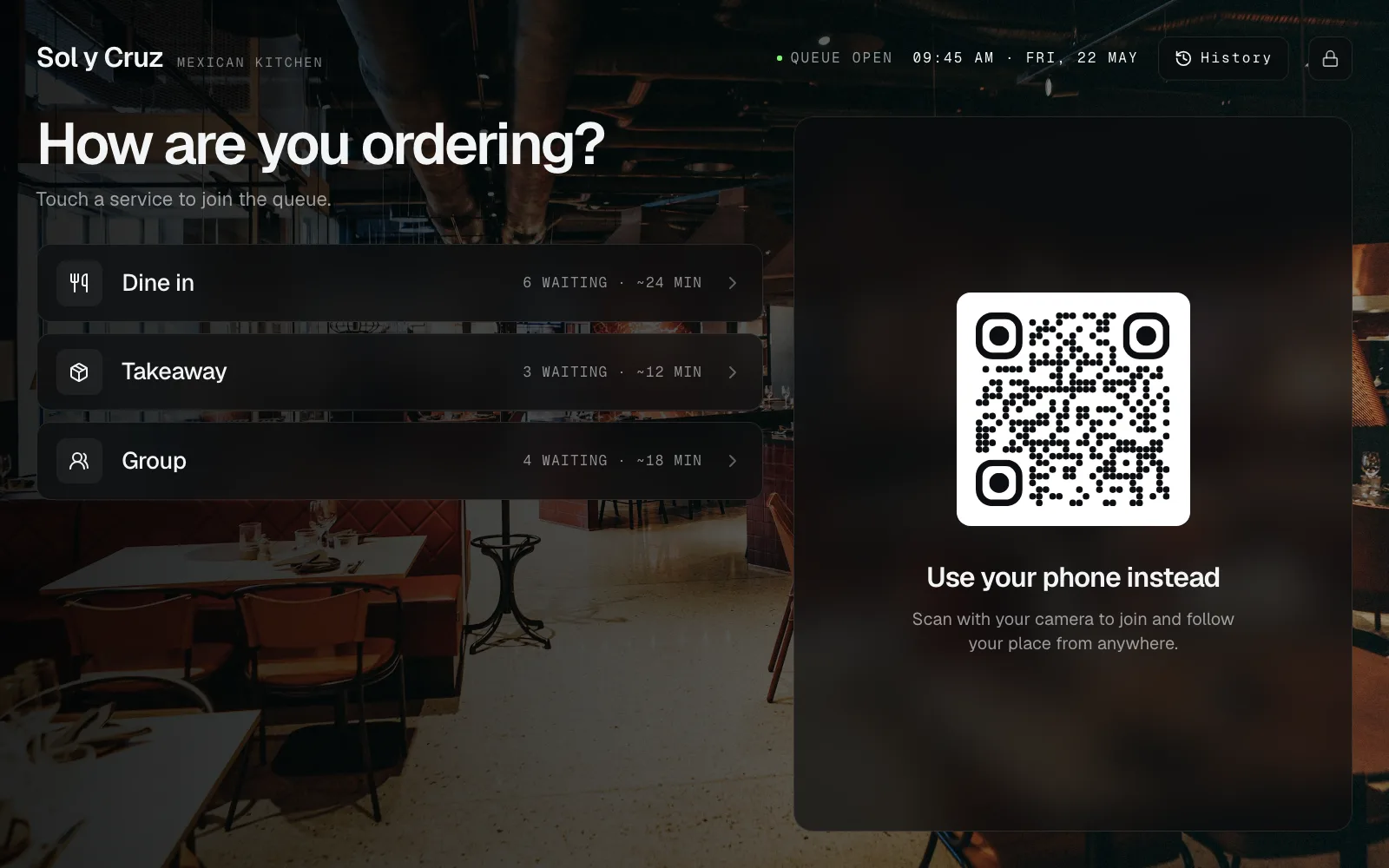
Printed QR for phones, or a paired tablet for lobby self check-in.
- Printed join QR — Download or print a poster so customers join from their own phones.
- Paired tablet kiosk — Run a dedicated check-in browser on an iPad or Android tablet you already own.
- Kiosk themes & branding — Colors, background, headline, and branding controls for the lobby device.
- Admin PIN & remote commands — PIN-protect settings; reload, log out, or identify a device from Control.
- Queue length & wait estimate on kiosk — Show live demand cues so guests know what to expect before joining.
- Appointment check-in on kiosk — Visitors enter a booking reference or scan their confirmation QR to check in at the tablet.
Waiting-room displays
Turn any browser-capable TV into a live board—no proprietary screens.
- Browser TV board — Now serving, waiting, and missed tickets on a paired display session.
- Service & counter scoping — Assign which services and counters each display shows.
- Themes, call highlight & QR footer — Visual polish for the room, including call emphasis and an optional join QR.
- RSS headlines ticker — Optional news or announcements strip from presets or a custom feed URL.
Staff Control
Realtime operations for the desk—home metrics, tickets, and counter tools.
- Location home — Live queue health, recent activity, service demand, and sortable widgets.
- Tickets history & search — Find past and current tickets; create staff tickets when needed.
- Counter desk — Claim a counter and run call/serve flows from a clear operator screen.
- Mobile remote — Operate a counter from a phone when staff are away from a desk screen.
- Services & devices — CRUD services; pair and manage kiosks and displays from one place.
Services & intake
Define what each location offers and collect the right details before the counter.
- Multi-service lanes — Separate queues per service with names, icons, colors, and order.
- Custom intake fields — Text, number, email, phone, select, date/time, consent, rating, address, and more.
- Required & optional fields — Mark fields required so staff get what they need before the customer arrives.
Organisation & team
Multi-location workspaces with roles that match how desks actually run—and staff sign-in that isn’t bolted on as an afterthought.
- Multi-location organisations — One workspace, many locations—each with its own services, counters, and devices.
- Owner, admin, staff roles — Invite the team with permission levels that fit desk vs management work.
- Location-scoped staff — Limit staff to the locations they actually work.
- Authenticator MFA for every account — Optional TOTP multi-factor authentication on staff and owner sign-in—included, not an enterprise-only add-on. Protects access to your queue dashboard and guest details.
- WorkOS AuthKit sign-in — Password, email code, and social sign-in run on WorkOS AuthKit—the same authentication stack used by modern B2B products—so account security isn’t a home-grown login form.
- Org branding & locale — Logo, brand colors, and date/time preferences for customer-facing surfaces.
- Stripe billing portal — Manage subscription and payment methods from Control.
Ops insights
Realtime operational visibility for the floor—not an enterprise BI suite.
- Live queue health — Waiting, called, and serving counts update in realtime.
- Service demand — Today vs yesterday demand buckets on the location home.
- Activity feeds — Recent desk activity so supervisors can see what just happened.
Appointments
Booked arrivals that land in the same queue as walk-ins—without becoming a full EMR or calendar suite.
- Booked slots alongside walk-ins — Turn appointments on per service. A service can take walk-ins, bookings, both, or neither.
- Public booking page — Customers pick a service and a time in the browser. Confirmation email on book; reminder 24 hours before.
- Today’s Arrivals — Staff list and calendar for today. Check-in from 60 minutes before until 30 minutes after the slot; cancel and no-show.
- Check-in mints a ticket — Checked-in bookings become normal tickets on the desk workflow—called, with staff, completed.
Pickup
Collection where the work is “ready for pickup,” not a standing walk-in line. A kiosk replaces the restaurant buzzer.
- Kiosk instead of a buzzer — Guests take a phone ticket at a tablet or QR. The Ticket updates when the order is called—no plastic disc to lose.
- Ready → called → collected — Start tickets at Ready. Call when the order is up. Mark collected when they leave. A serving Counter is optional.
- Uncollected follow-up — Uncollected is a follow-up status. End-of-day rollover can move stale ready tickets there automatically.
Office visitors
Lobby kiosks with two streams: here to see someone, or a delivery. Hosts get pinged without a badge printer.
- Two reasons at the door — Invited guests and couriers self-select on a tablet or QR. Add more Services if recruiting days need their own line.
- Waiting, host notified, with host — Lobby language on the ticket. A reception Counter is optional if you want Call Next on a desk screen.
- Host email or Slack — Automations email a host or post to Slack when a visitor is created, called, or reaches a status you choose.
Event check-in
Studios and gyms that need a door list, not a serving Counter.
- Registered, checked in, waitlisted — Class nights start as Registered. Staff mark present on the tickets board. Waitlisted if the room is full.
- No Counter required — Event check-in is a board workflow. Guests pick hot yoga, pilates, or strength at a kiosk or QR.
Integrations
Connect your stack via webhooks and Zapier—not a maze of one-off native connectors.
- Outbound webhooks (Coming soon) — Signed payloads on ticket lifecycle events (created, called, completed, cancelled / no-show).
- Public API (Coming soon) — Thin authenticated API for the reads and actions automation tools need.
- Zapier (Coming soon) — Triggers and actions so you can reach Zapier’s catalog without per-vendor connectors.
What we don’t sell
Esperaly is a ticket and counter product. We deliberately skip the enterprise maze—so teams can go live without extras they may not need on day one.
- Push “your turn” notifications
- Geo-fencing or occupancy / people counting
- Native Salesforce or per-vendor CRM connectors
- SAML / SSO (not available yet)
- Enterprise report builders or white-label HTML/CSS
- Mandatory proprietary kiosk hardware
- Full EMR, practice-management, or calendar-suite replacements
Ready to try Esperaly?
Start free, set up a location, and run a live queue on phones and screens you already have.