Business
Office Visitor Check-In Queue Management: Calm the Lobby Without a Clipboard
How HQ and campus receptions run fair visitor Tickets—guest vs delivery Services, optional Counters, host notify, and an honest split from badge printers.
· Esperaly Editorial · 10 min read
Corporate lobbies are judged in the first ninety seconds. A candidate arrives for an interview, a courier has a parcel, a contractor needs a badge escort—and reception is still juggling a clipboard, a Slack scramble, and “who got here first?” That is the job office visitor check-in queue management is supposed to solve—not a badge-printer appliance, not an access-control suite, and not a fake #1 ranking for visitor software.
This guide is for HQ receptions, tech campuses, co-working front desks, and multi-tenant lobbies that mix invited guests with deliveries on the same morning. You will get a Ticket / Counter / Service model that matches how lobbies already talk, a practical floor setup on devices you already own, and an honest split from full visitor-management platforms. For product context, see Esperaly for offices & campuses and the focused walkthrough on office visitor check-in. If you run student-facing admin desks instead of corporate reception, use the companion piece on campus admin queue management—different visitors, different Service map.
What office visitor check-in queue management actually does
Strip the category to the loop that matters when interviews, deliveries, and drop-ins share one sofa bank:
- A visitor joins with a Ticket (tablet kiosk in the lobby, or a printed QR at the desk)
- They choose a Service that matches real need—here to see someone, delivery / goods-in, or interview on recruiting days—not an internal CRM code
- Staff (or an automation) move the Ticket through statuses that match the lobby: waiting, host notified, with host. A reception Counter is optional when someone wants Call Next on a desk screen
- The host learns the guest arrived—email or Slack—without a phone tag from reception every time
If a vendor cannot show that loop without a sales deck about badge printers, turnstile integrations, or a full calendar suite you did not ask for, you are shopping for a different category. The live demo is the fastest way to see join → wait → notify on everyday devices.
Why clipboard lobbies fail at peak
Paper sign-in and memory work until a two-minute courier lands behind a twenty-minute interview wait, two tenants share one informal list, or a host only learns their visitor arrived after someone phones upstairs. Guests absorb it as favouritism and a crowded sofa. Reception absorbs it as constant mediation. Security absorbs it as “who is expected versus walk-up?” with nothing shared.
Digital Tickets make order visible. Guests see place in line for the Service they chose. Reception sees who is waiting for a host versus who is a parcel. When someone challenges fairness at the desk, you have a sequence to point at instead of memory. In a branded lobby, that clarity is as important as raw speed.
For the cost side of paper vs digital operating models—not the lobby Service map—see true cost of paper tickets vs digital queues and the medium trade-off in paper ticket vs QR queue.
Map the lobby with Services (and optional Counters)
Lobby queue projects fail when teams publish twelve Services nobody understands, or copy badge-workflow states onto a join screen. Start simple and match how visitors answer “why are you here?”
Services that match real lobby jobs
- Here to see someone — invited guests, meetings, interviews that need a host; the bulk of most mornings
- Delivery / goods-in — couriers and parcels; wrong to bury behind candidates on the same sofa
- Interview / recruiting day — optional third Service when you want a separate slate on busy hiring days; merge if the same reception handles it identically
- Contractor / escort — only if that path truly waits differently; otherwise keep it inside “here to see someone” with a host field
Prefer names a visitor would tap without asking reception to translate. If two Services always share the same wait and the same handoff, merge them. Split only when the wait or staffing path is genuinely different—see when to split queue Services.
Counters are optional capacity, not a badge printer
In Esperaly terms, a Counter is capacity that can call the next Ticket—useful when reception staffs Call Next. Many office lobbies do not need it on day one: the kiosk collects the Ticket, automations ping the host, and the host walks out. Add a Counter when someone at the desk wants a shared “who’s next” screen during interview marathons or multi-tenant peaks. You are buying capacity when you need it, not a login tax—details live on pricing.
If you are still guessing how busy the lobby gets at 9 a.m., work arrival and service-time numbers with how many counters do you need and the wait-time estimator. “We have two receptionists” is not the same as “we have a Counter free to call the next guest”—someone may be signing for parcels or escorting upstairs.
Tablet kiosk vs QR at reception (use both)
Most lobbies should default to a shared tablet and keep a printed QR as backup:
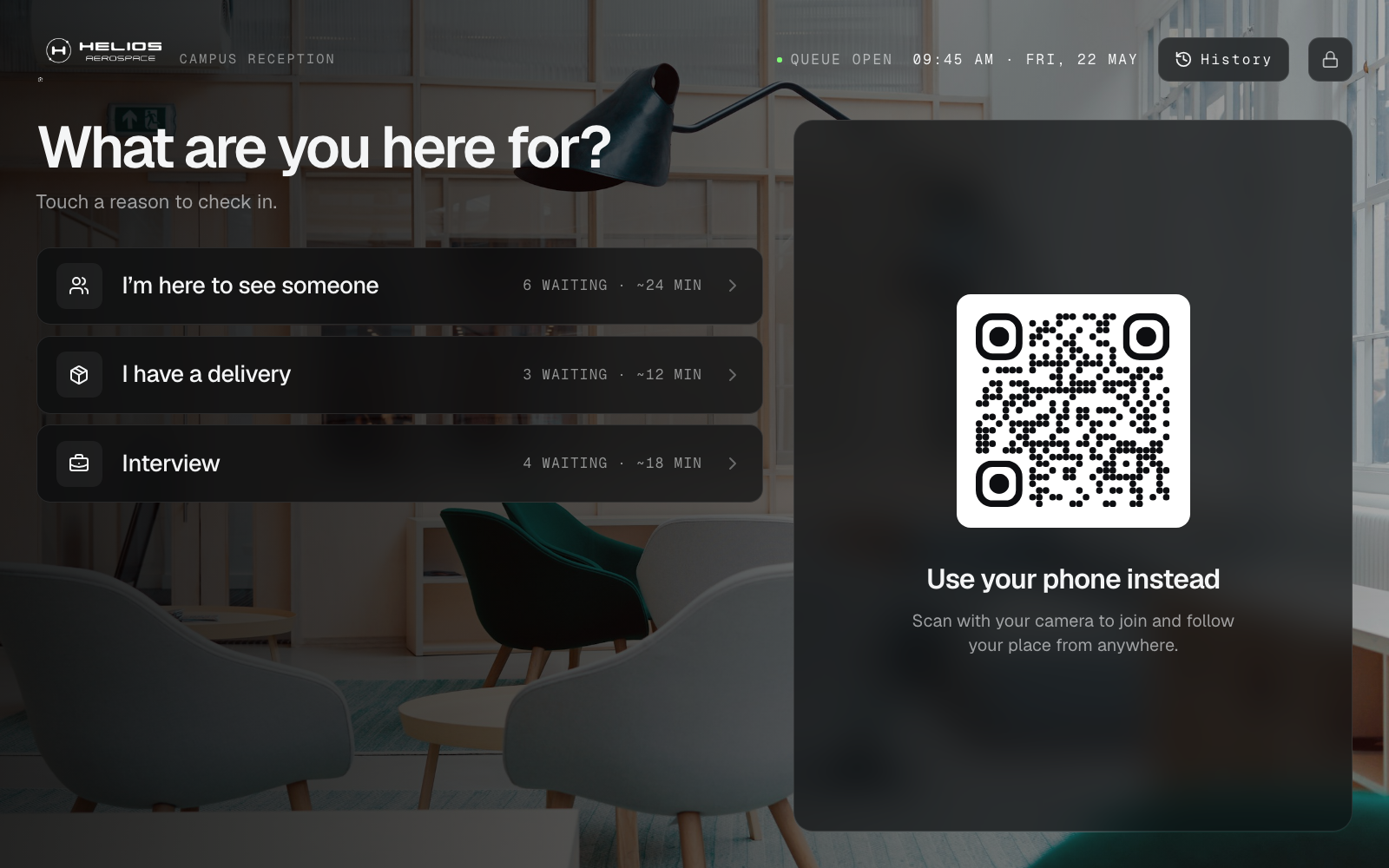
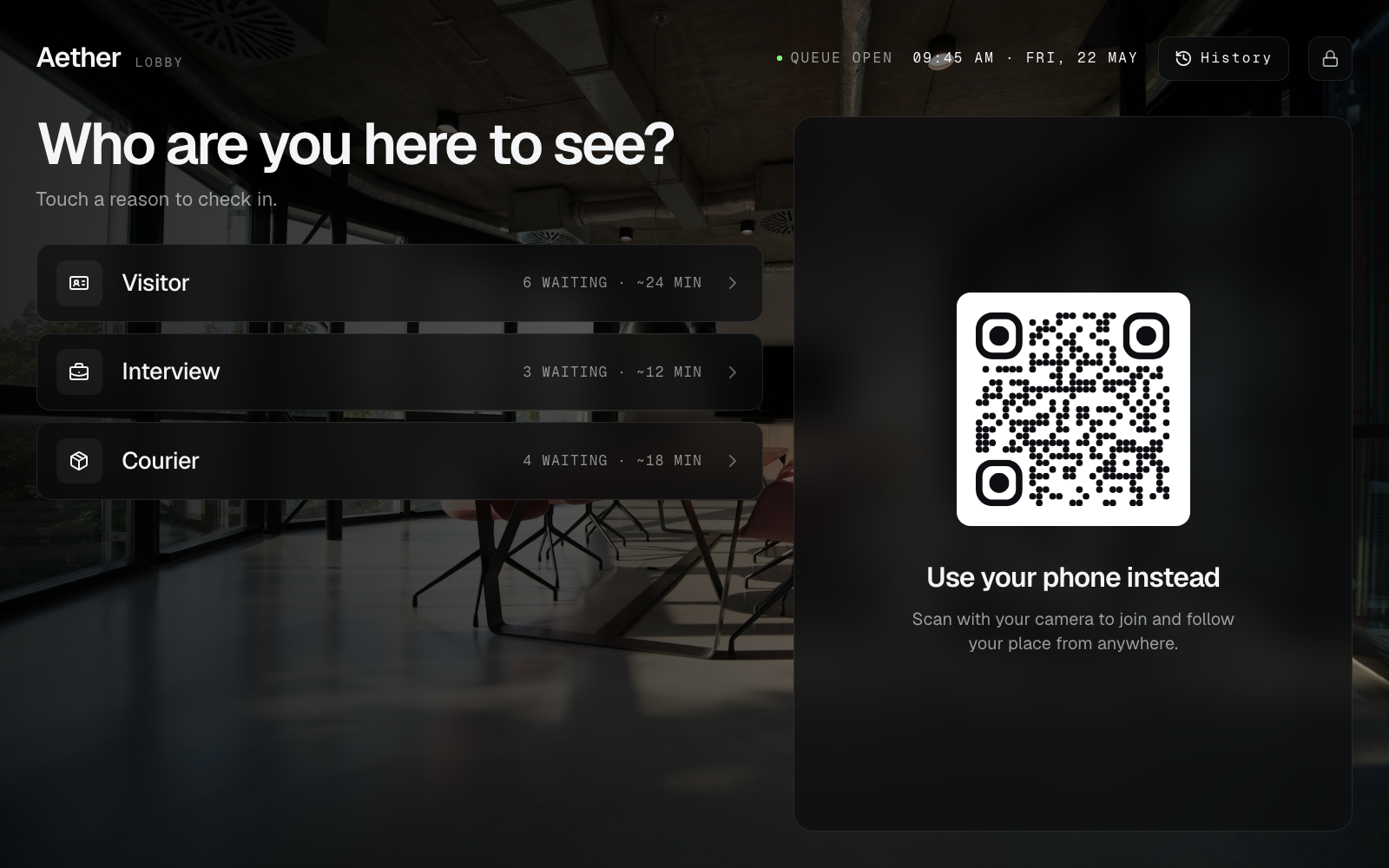
- Tablet kiosk at the desk — two clear buttons (guest vs delivery) so visitors self-select without a lecture. See office visitors.
- Printed QR at the entrance — for empty batteries, accessibility needs, or anyone who prefers to join from their phone. See QR join.
- Phone Ticket as the waiting room — guests can wait nearby instead of crowding the sofa bank. Pair with phone tickets.
You do not need a badge printer or a visitor-management appliance on day one. A tablet you already own and a printed QR is enough—covered in do you need expensive queue hardware. For the join-path trade-off in more detail, read QR join vs tablet kiosk. This is the join screen on that tablet—example venues, not real brands:
Host notify without turning the lobby into a CRM
The highest-value office pattern is simple: when a Ticket is created (or called), email the host or post to a Slack webhook. Host name can be an intake field. Statuses stay lobby-native—waiting, host notified, with host—so reception and hosts share the same language without a custom workflow designer.
That is not the same as buying Envoy-style badge printing, watchlists, or door integrations. Those tools excel when security policy requires them. Queue tools excel at fair same-day order and “your guest is downstairs” when the pain is a crowded lobby and a phone-tag host. Keep the boundary honest: Esperaly is Ticket / Counter / Service flow with optional host pings—not an access-control system and not an appointments engine for the whole campus calendar.
Reducing ghost Tickets and sofa abandonment is mostly clarity and fair handoff—not forcing every walk-up onto a calendar. See reduce walk-in queue no-shows and staff training to call the next Ticket. Prefer Ticket numbers over full names on any public board—see QR Ticket privacy basics. If you mount a quiet now-serving screen, keep it a fairness mirror—see waiting-room display and queue display board software.
Lobby rules that keep reception calm
Software fails when habits stay clipboard. Agree on a few rules before go-live:
- Two buttons, not twelve — guest vs delivery covers most days; add interview only when the slate is genuinely separate
- One notify path — automations ping the host; do not invent a competing “I’ll WhatsApp them” side channel for VIPs
- Counter optional, habits required — if you staff Call Next, only the Counter screen (or a named lead) calls; kill shadow lists the same day
- Pause join when you are behind — better than a forty-minute phantom wait on an interview morning
- Train the loop, not the feature list — relief reception should know join → notify → with host in five minutes
Messaging helps when you measure abandonments and budget for it; it is optional until the visible Ticket order and host ping work. Do not buy a queue product because it promises to become your entire workplace OS.
A same-week setup for a busy reception
You do not need a four-week implementation. A realistic path:
- Morning 1 — name 2–3 lobby Services; decide whether reception needs a Counter today or host-notify alone
- Afternoon 1 — put a tablet kiosk (or printed QR) at the desk; wire email or Slack for host notify
- Quiet hour — staff join test Tickets, confirm host pings, walk a Ticket to with host
- First peak — run live with one lead watching for shadow clipboards or “just this once” side lines; kill the shadow list the same day
- End of week — review courier vs guest mix, missed host pings, and whether Service names confused visitors
For a generic launch checklist, reuse set up a digital queue in under an hour. Lobby-specific work is mostly naming guest vs delivery Services and deciding whether Call Next is needed at all.
What to evaluate before you buy
Score vendors yourself. Useful questions for facilities, workplace, and reception leads:
- Can a visitor join in under a minute without installing an app?
- Can reception answer “who is waiting for a host vs a delivery?” on one screen?
- Does pricing follow desks/Counters, or per-user seat taxes you will resent by month two?
- Can you go live this week on devices you already own?
- Does the vendor pressure you into badge printers or access-control rewrites before the lobby queue works?
- Are they honest that security watchlists and door hardware stay in existing tools if those already work?
Run the monthly cost against your desk count with the queue cost calculator. Skip vanity feature theatre—the companion post what to ignore when buying queue software still applies behind a busy reception. If you are evaluating Waitwhile-style waitlists, compare the fit notes on Esperaly vs Waitwhile. For Qminder-style multi-location desks, see Esperaly vs Qminder. For a broader SMB checklist without a fake #1 trophy, use the small-business buyer guide. For walk-in-first category framing, read walk-in line management software.
When to wait before buying
Queue software is the wrong first project if:
- Wi‑Fi in the lobby cannot keep a tablet online
- Leadership has not decided how guests interleave with deliveries on the sofa bank
- The real pain is badge policy, turnstiles, or a broken visitor management mandate—not the crowd at reception
- Nobody will own host-notify habits for the first peak morning
Fix those first. A clean Ticket system with no owner becomes optional decoration by Friday of week one. If you only know the lobby “feels busy,” estimate waits before you sign—see how to estimate queue wait times before buying.
Get a calmer lobby this week
Office visitor check-in queue management earns its keep when guests know their place, hosts learn arrivals without a phone tag, and reception stops mediating memory between couriers and candidates. Start with two clear Services, an honest host-notify path, and a tablet visitors can use without a lecture.
When you are ready to test with your real Service names, start a 14-day trial or explore offices & campuses positioning. Prove join → notify → with host on one quiet weekday. If that loop feels obvious to your team, you have the right class of tool.