Retail
Retail Service Desk Queue Management: Calm Returns Without a Crowd
How electronics stores, telecom counters, and retail returns desks run fair walk-in Ticket lines—Services, Counters, QR join, and an honest split from POS and booking tools.
· Esperaly Editorial · 10 min read
Saturday afternoon at a busy electronics or fashion store looks familiar: a returns pile, two warranty questions, someone waiting for click-and-collect, and an associate mid-refund being interrupted with “who’s next?” Invisible order turns into crowding at the desk. That is the job retail service desk queue management is supposed to solve—not a POS rewrite, not a loyalty platform, and not a waitlist bolted onto the till.
This guide is for retail customer-service desks, returns counters, telecom and electronics help desks, and multi-location service floors that run real same-day walk-in traffic. You will get a clear Ticket, Counter, and Service model, a practical floor setup, and an honest split between queue software and the POS or booking tools you already use. For industry context, see Esperaly for retail & customer service.
What retail service desk queue management actually does
Strip the category to the loop that matters when the desk is slammed:
- A customer joins with a Ticket (phone QR near the desk, or a reception tablet)
- They choose a Service that matches real intent—returns, exchanges, tech help, click-and-collect—not internal SKU codes
- Staff call the next Ticket at a Counter (a desk or window that can take the next person)
- The floor stays informed—on the phone Ticket and, optionally, a small now-serving board
If a product cannot show that loop without a sales deck about checkout conversion engines or workforce scheduling, you are shopping for store OS software—not a service-desk queue. The live demo is the fastest way to see join → wait → call on everyday devices.
Why the clipboard (and hovering) fails at the service desk
Paper lists and shouted names work until two returns arrive together, a warranty claim overlaps a pickup, or a regular expects to skip because they “know someone on the floor.” The conflict is not personality—it is an invisible order. Associates absorb it as interruptions. The aisle absorbs it as a crowd blocking the desk. Customers absorb it as “this store feels chaotic,” which is a brand problem as much as an ops problem.
Digital Tickets make order visible. Customers see place in line. Staff see who is next without guessing across Counters. When someone challenges fairness, you have a sequence to point at instead of memory. That alone often pays for the tool on a single peak weekend—especially when returns and tech help share the same physical desk.
For the broader trade-off between phone-based virtual waits and classic walk-in tickets, read virtual queue vs walk-in ticket queue. Retail floors usually want both: shoppers keep browsing (or wait in the car for pickup) while holding a Ticket, then return when a Counter is free.
Map the desk with Services and Counters
Retail queue projects fail when teams invent twelve Services nobody will pick, or copy airport naming onto a two-desk returns wall. Start simple and match how customers actually ask at the counter.
Services that match real arrival intents
- Returns / exchanges — high volume, paperwork-heavy, often the loudest peak
- Tech help / troubleshooting — longer desk time; wrong to bury inside a generic “customer service” Service
- Click-and-collect / order pickup — short interactions that should not wait behind a warranty deep-dive. Use the pickup starting list (Ready → called → collected) when the job starts when the order is ready, not when someone joins a standing line.
- Warranty / repairs intake — when that stream has its own pacing or specialist
- Next available associate — only if you truly rotate walk-ins across the team
Prefer names a first-time shopper would tap without asking staff to translate. If two Services always share the same people and the same wait, merge them. Split only when the wait or skill path is genuinely different—similar to how multi-desk teams use multi-counter setups.
Counters as desks, not “user seats”
In Esperaly terms, a Counter is capacity that can call the next Ticket—an open returns window, a tech-help desk, a pickup shelf station. You are buying capacity, not a login. That maps cleanly to store maths: open three Counters on Saturday, pay for three; run a quieter Tuesday with one. Details live on pricing.
If you are still guessing how many desks you need at peak, work the arrival and service-time numbers with how many counters do you need and the wait-time estimator. “We have four people on the floor” is not the same as “we have four Counters free for walk-in service right now”—someone may be restocking or on a phone escalation.
QR join vs tablet at the desk (use both)
Most retail service desks should default to QR join and keep a tablet as backup:
- QR near the desk or entrance to the service area — customers scan, pick a Service, hold a live Ticket. No app store. See QR join.
- Desk tablet — for empty batteries, accessibility needs, or guests who prefer staff to issue the Ticket.
- Phone Ticket as the waiting room — customers can keep browsing, sit in the café next door, or wait in the car for pickup. Pair with phone tickets.
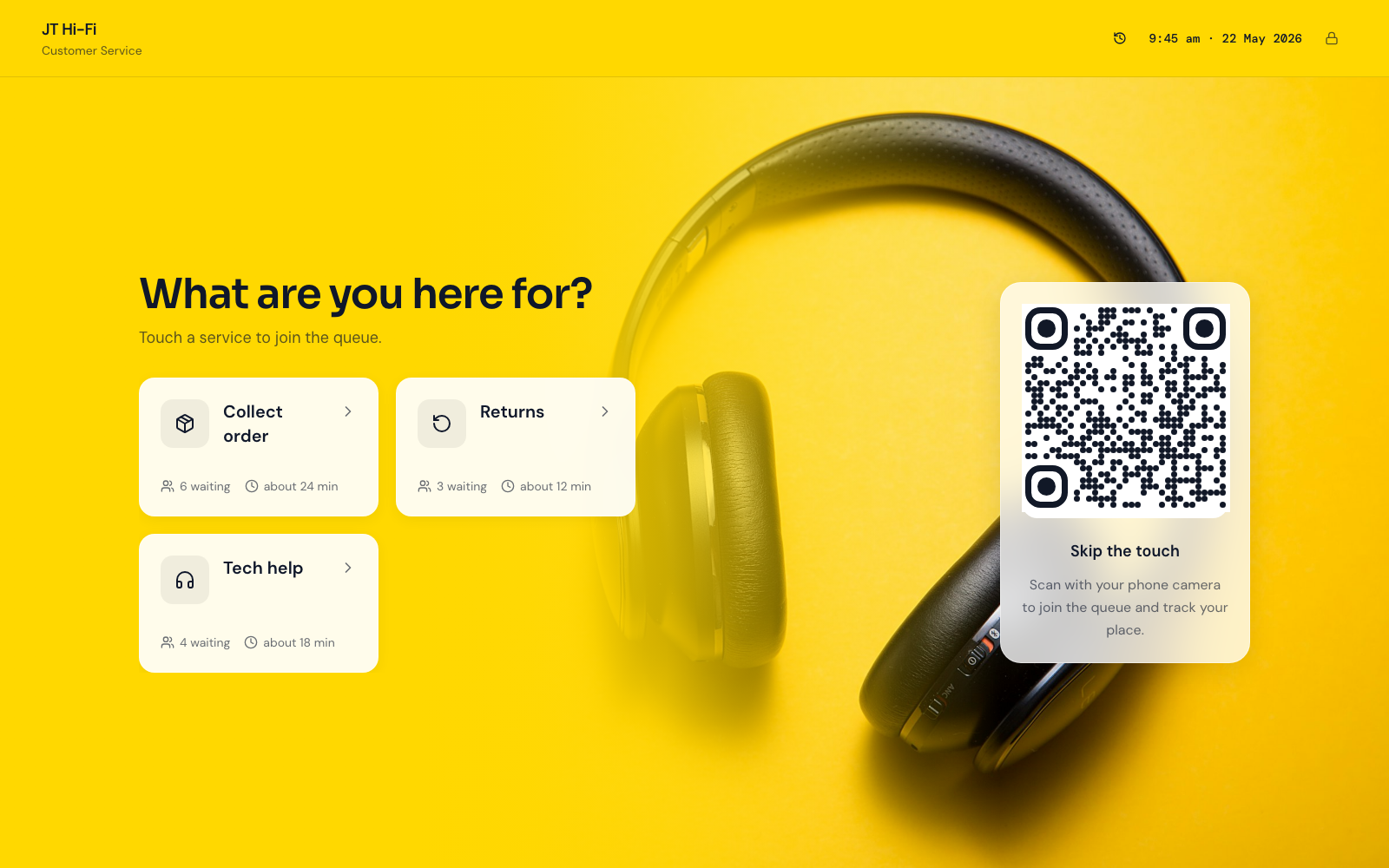
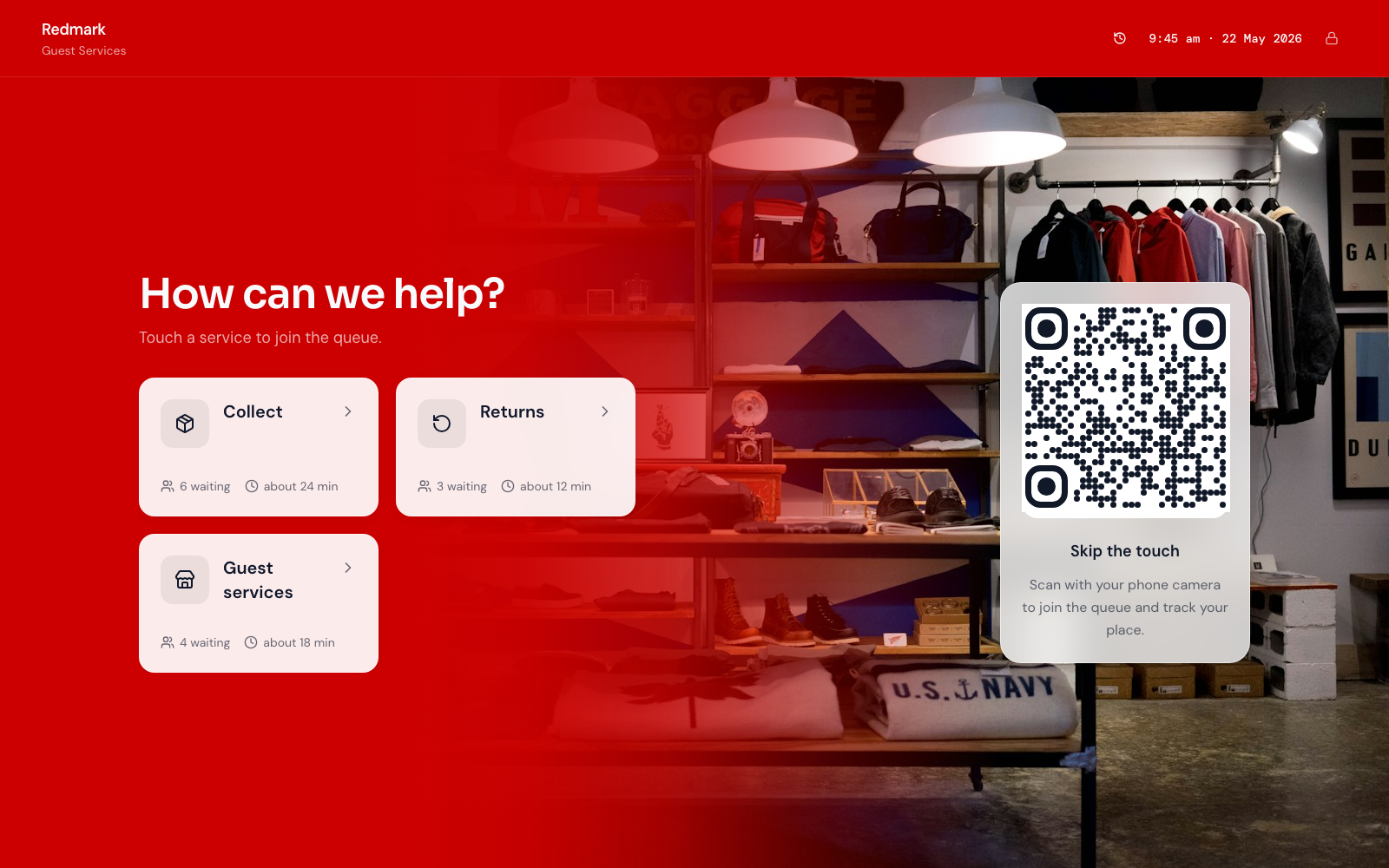
You do not need a pedestal kiosk on day one. A printed QR and a tablet you already own is enough—covered in do you need expensive queue hardware. That is also why service desk ticket queue software should not force a proprietary dispenser before the join → call loop works. This is the join screen on that tablet—two example retail desks, not real brands:
A small board without turning the desk into an airport
A calm board helps when the floor is noisy, phones stay in pockets, or families share one screen. Keep it professional:
- Show who was called and who is next—not a wall of promo carousels
- Use a TV or tablet you already mount near the desk
- Avoid flashing “now serving” theatre that fights a premium brand
- Match the same Ticket numbers staff see on the Counter screen—see waiting-room display and queue display board software
The display is a fairness mirror, not a second product. If the Counter call and the board disagree, customers will trust neither.
Walk-in queues vs POS, OMS, and booking tools (keep the boundary)
Many stores run returns, pickups, and booked consultations on the same day. That does not mean one vendor must own every system. POS and order management excel at inventory, receipts, and fulfilment status. Booking tools excel at scheduled consultations. Queue tools excel at fair same-day order when people show up at the desk without a perfect slot—or when pickups pile up while an associate is mid-return.
Esperaly is Ticket / Counter / Service flow—not a POS, not an OMS, and not a full booking OS. Collect can run as pickup. Booked consultations can check in from Arrivals and become the same Tickets as walk-ins. Keep the commerce stack for transactions and stock. Use the queue for the service-desk line so returns, collect, and help do not share one shouted name list. Floor leadership’s job is to interleave: a booked consultation at their time; a walk-in holding a Ticket until a Counter is free for that Service.
If you are evaluating Waitwhile-style tools that lean into waitlists plus messaging, compare the fit notes on Esperaly vs Waitwhile. For a broader SMB checklist without a fake #1 trophy, use the small-business buyer guide.
Floor rules that keep associates focused
Software fails when habits stay sticky-note. Agree on a few rules before go-live:
- One call path — only the Counter screen (or a named host) calls the next Ticket. No competing “I’ll take her”
- Transfer on purpose — if a pickup becomes a return, transfer Services instead of inventing a side list
- Pause when desks are blocked — a manager escalation or stock hunt is not “available”; do not leave a Counter open if nobody can take a walk-in
- Close the queue when you are full — better than a 90-minute phantom wait that burns trust
- Train the loop, not the feature list — weekend cover should know join → call → serve in five minutes
Reducing hovering at the desk is mostly about clarity, not SMS theatre. Messaging helps when you measure no-shows and budget for it; it is optional until the visible Ticket order works. Do not buy a queue product because it promises to become your entire retail OS.
A same-week setup for a returns or help desk
You do not need a four-week implementation. A realistic path:
- Morning 1 — name 2–4 Services; decide which desks are walk-in Counters today
- Afternoon 1 — print or stand a QR; put the Counter view on a phone or tablet at the desk
- Quiet hour — staff join test Tickets, call them, confirm any board matches
- First peak — run live with one host watching for shadow clipboards; kill the shadow list the same day
- End of week — review wait complaints, abandonments, and whether Service names confused anyone
For a generic launch checklist, reuse set up a digital queue in under an hour. Retail-specific work is mostly naming Services and deciding which desks accept walk-ins versus specialist-only help.
What to evaluate before you buy
Score vendors yourself. Useful questions for store managers and ops leads:
- Can a customer join in under a minute without installing an app?
- Can staff answer “who’s next?” on one screen?
- Does pricing follow desks/Counters, or per-user seat taxes you will resent by month two?
- Can you go live this week on devices you already own?
- Does the vendor pressure you into proprietary kiosks or a POS rewrite before the queue works?
- Are they honest that receipts, inventory, and bookings stay in your existing tools if those already work?
Run the monthly cost against your desk count with the queue cost calculator. Skip vanity feature theatre—the companion post what to ignore when buying queue software still applies on a retail floor. If you are comparing Qminder-style multi-location desks, see Esperaly vs Qminder.
When to wait before buying
Queue software is the wrong first project if:
- Wi‑Fi at the desk cannot keep a phone online
- Leadership has not decided which desks accept returns versus tech-only help
- The real pain is inventory accuracy or courier delays—not the doorway line at the service desk
- Nobody will own the host habits for the first peak weekend
Fix those first. A clean Ticket system with no owner becomes optional decoration by Friday.
Get a calmer service desk this week
Retail service desk queue management earns its keep when walk-ins know their place, associates stay in the refund or repair, and the aisle stops mediating memory. Start with clear Services, honest Counter capacity, and a QR customers can scan without a lecture.
When you are ready to test with your real Service names, start a 14-day trial or explore retail positioning. Prove join → wait → call on one quiet morning. If that loop feels obvious to your team, you have the right class of tool.